 Casino
 Scratchcards
 Play
PlayEuroMillions Lottery App
With the EuroMillions app, you can find everything you need to know about the biggest lottery in Europe in the palm of your hand, with access to a range of features including a ticket scanner. Download for free now on IOS or Android.
- Get the latest results here first
- Scan tickets to see if you've won
- See detailed prize info and raffle results
- Use the Checker for multiple lines
- Generate random 'Lucky Dip' numbers
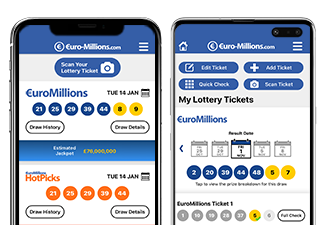
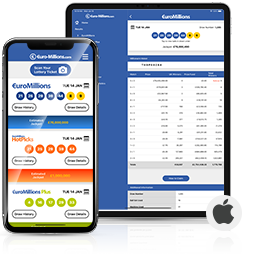
The EuroMillions iOS app is available to download for free from the App Store. Get it now to take advantage of all the new and updated features. This euro lottery app is easy to use and is compatible with all iPhone, iPad and iPod Touch devices using iOS 10.0 or higher.

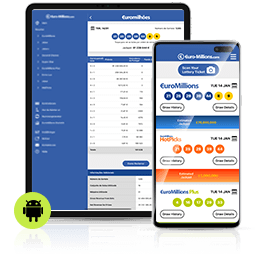
Also available at no cost is the EuroMillions Android App. Download this app to your Android device to keep up to date with the latest results and information, and enjoy all the innovative new features. Visit the Google Play Store and select the 'Install' button to download it to your device.

Top Features
Whether you're an iOS or Android user, the application has been designed to make playing EuroMillions easier and more enjoyable than ever. Take a look at some of the great features included in the app.
Scan EuroMillions Tickets
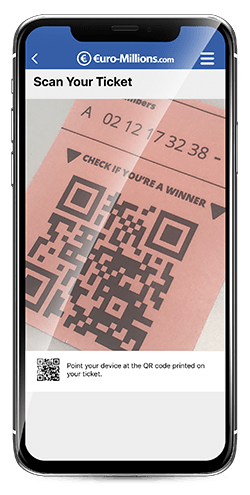
It has never been easier to find out if your ticket is a winner thanks to the app's new scanner. This handy tool allows you to compare your numbers against recent results. It works for EuroMillions tickets in the UK and Spain. Here's how to do it:
- Access the scanner by tapping 'Scan Your Ticket' from the menu or from the home screen. It can also be accessed from the Checker screen.
- The first time you access the scanner you will need to give the app permission to use the camera. You can change this permission at any time in your device's settings.
- Point your device's camera at the QR code (the square barcode) on your ticket. The code needs to be in focus so you may need to reposition your device until the camera focusses properly.
The app will then check the numbers on the ticket against recent results, and a message will pop up immediately to say whether you have won or not, even if the prize breakdown has not been announced yet. If the full results are in, you'll see exactly how much you have won.
Check your Numbers
The Checker allows you to validate your numbers in different ways so that you can find out if you are a winner. As well as scanning your ticket, you can select 'Quick Check' or Add Ticket' once you have got to the main Checker screen from the menu.
- Quick Check - Select your five main numbers and two Lucky Stars from the number grids. Hit 'Check Numbers' when you are ready. The app will bring up a list of recent results and highlight numbers that you have matched, showing the value of any prizes you have won.
- Add Ticket - Select your numbers from the grids of main balls and Lucky Stars. Choose whether you want to check those numbers in Tuesday or Friday draws. Tap 'Save Ticket' when you are finished. The app will show you whether those numbers have won a prize in the most recent draw, while you can carry out a 'Full Check' to look at the results for all recent draws. Select 'only show winning results' to only see the draws in which you have won prizes.
With these numbers now saved on the app, the Checker will be able to tell you straight away in future whether you are a winner, without you having to enter your selections again. To modify or delete any tickets that you have saved, tap on 'Edit Ticket'. You can then select one of the tickets you have saved to make your changes.
Customise the App
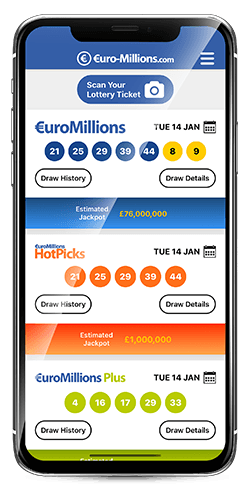
Whether you're a EuroMillions player in the UK, Spain or elsewhere, set up the app to show the most relevant information for you. Through the settings, you can:
- Choose your lotteries - EuroMillions has a host of associated games across the different participating countries, from HotPicks in the UK to EuroMillions Plus in Ireland or even Belgium's Joker+.
- Choose your country - Select which country you are in so the app will show you the appropriate prize breakdown.
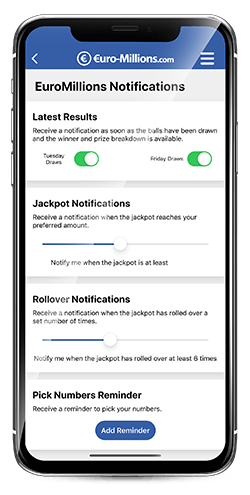
You can even choose from more than 10 different languages, and also customise your notifications. Set up alerts to find out when the winning numbers are drawn, when the jackpot has hit a specified value or when a special event such as a Superdraw has been announced. It's entirely under your control which type of EuroMillions notifications you receive.